
Upgrade AP,
not your ERP.
Modern AP automation for the systems you already run — on-prem, IBM i (AS/400), hybrid, or cloud.
Approval-first design. IT-safe integration. No ERP migration required.
- 40+ Years in Business
- 5,000+ Organizations
- IBM i Specialists
- Secure & Audit-Ready
Please find attached the invoice for the recent electronics shipment.













AP Results That Matter
Fewer Touches Per Document
Reduce manual handling by automating invoice capture, matching, and routing — so fewer hands touch every transaction.
Less Manual Keying Time
Eliminate repetitive data entry with intelligent extraction and ERP integration that posts accurately the first time.
Faster Approval Turnaround
Accelerate workflows with rules-based routing and real-time visibility that keeps invoices moving.
Higher First-Pass Posting Accuracy
Improve data integrity with automated validation and tolerance checks — minimizing exceptions and rework.
Meet AutoLedger
Modern AP automation without ERP disruption.
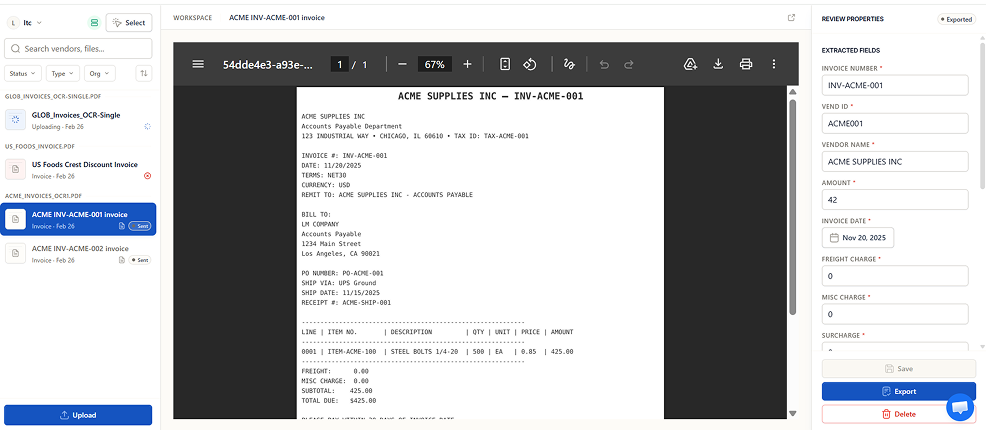
- Automates invoices, POs, shipping docs, credit memos
- Validates vendor, PO, receipt data
- Enforces tolerance checks
- Prevents duplicates before posting
- Maintains your approval workflow
We Fit Your Environment — Not the Other Way Around
Modern AP automation for legacy systems.
Direct ERP connection where supported.
IFS, SFTP, CSV, XML, JSON
Ideal for IBM i / AS400 & on-prem systems.
- IT Confidence
Security & IT confidence
Designed to pass security review. We publish controls, not claims.
SAML, OAuth 2.0, Azure AD integration
TLS 1.3 in transit, AES-256 at rest
Single service account, minimal permissions
No inbound ports required on your network
Complete action history, field-level tracking
Configurable retention policies
Real-time monitoring and alerts
Documented recovery in minutes
"Outbound-only agent, least privilege, no schema changes. We'll show logs and rollback. Install window is ≤ 2 hours. Security exceptions: none."
Deep IBM i / AS400 Expertise
For decades, ACOM has powered document output, payments, and EDI directly inside IBM midrange environments. AutoLedger extends that expertise into modern automation.
Still Supporting What You Run
EZConnect (EDI Platform)
Real-time trading partner integration.
IBM i Document Output (EZeDocs/400)
Spool file to laser forms and PDFs.
EZPaySuite (Web Payment Hub)
ACH, check, card payments + vendor portal.
EZContentManager (Document & Workflow Hub)
Capture, approve, archive + instantly retrieve business documents.
Trusted by Teams Nationwide
We use XA ERP by Infor and the ACOM product is the most valuable add-on. Their software application helps us communicate with our customers, vendors, banks and internally. It is very flexible and can accommodate many different setup paths for these interfaces. Support is excellent and ACOM folks are very knowledgeable.

We have used ACOM Software for over 25 years creating forms, checks and bill-of-sale documents for our Auto Auction customers across the USA & Canada. Once documents are created, they are immediately available via email to dealers, banks, lenders and for other auction business use. If the rare chance of an issue comes up, I know that I will always have ACOM’s fast response and resolution.

ACOM is one of the areas within our iSeries system that we just don’t have to worry with as the software runs flawlessly all the time. If we ever do have a question on how to do something, the Help Desk is super easy to work with and very reliable. Remote access is a breeze, and the analysts are very good at what they do – but we just almost never have to call them! For the money, it is an easy decision to renew each year. Their service and software is top notch.
- FAQ
Frequently asked questions
Finance-first, IT-credible answers.
Solutions What does ACOM Systems help businesses automate?
Automation How can ACOM reduce accounts payable costs?
Automation Why should companies start AP automation with payments?
EDI Integration What is EZConnect and who is it for?
Business Outcomes How does EZConnect improve business operations?
IBM i / AS400 Can ACOM work with IBM i / AS400 systems?
Document Management What is EZContentManager used for?
ROI How much can document management automation save?
Implementation How long does it take to implement ACOM solutions?
Why ACOM Why do companies choose ACOM over other automation vendors?
Schedule Your Demonstration
Modernize Accounts Payable Without Replacing Your ERP.
See how ACOM automation solutions reduce costs, increase accuracy, and streamline invoice and payment workflows.
- Sales: (800) 603-6768, ext. 2
- Email: [email protected]
- 2455 Meadowbrook Pkwy NW, Duluth, GA 30096